
Free Slideshare Downloader – PPT & PDF Instantly
Download SlideShare presentations in high quality without a login. Fast, secure, and completely free!
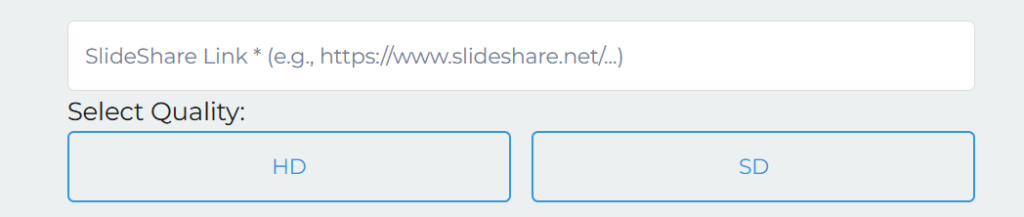
Copy URL
Copy the SlideShare presentation URL you want to download.
Paste URL
Paste the URL of the slide into the download box.
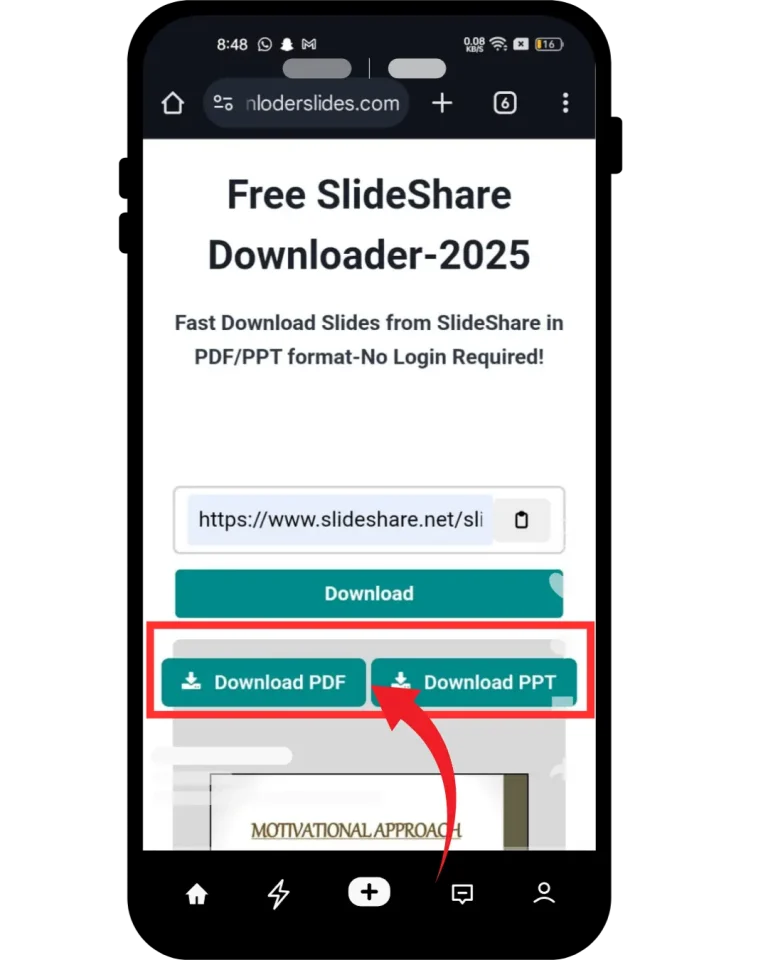
Download
Click the download button and save your file on your device instantly.
Free SlideShare Downloader Tool (PPT/PDF/Doc)
This free SlideShare downloader lets you download SlideShare PPT and PDF files instantly, without logging in. Whether you want to save presentations for offline use, study, or research, this tool provides a fast and simple solution.
Slideshare is a popular platform with many presentations, slides, documents, and images. While it’s mostly free, it only allows you to download a limited number of files. However, with this slide Downloader, you can download as many slides as you want and save them anywhere you need. Follow this article to learn how to download Slideshare presentations easily!
Why Use Our SlideShare Downloader?
Our SlideShare downloader is built for users who want a fast, simple, and reliable way to download presentations without unnecessary steps. Unlike many tools that are slow, cluttered, or require registration, this tool focuses on delivering a smooth experience from start to finish.
You don’t need to sign up, install software, or go through complicated processes. Just paste your SlideShare link and download your file instantly in your preferred format, including PPT and PDF.
The tool is designed to work on all devices, whether you’re using a mobile phone, tablet, or desktop. It ensures high-quality downloads while keeping your data safe and private.
Whether you’re a student saving slides for study, a professional collecting presentation ideas, or a researcher gathering resources, this SlideShare downloader helps you get the job done quickly and efficiently.
Simple steps to download slides from SlideShare?
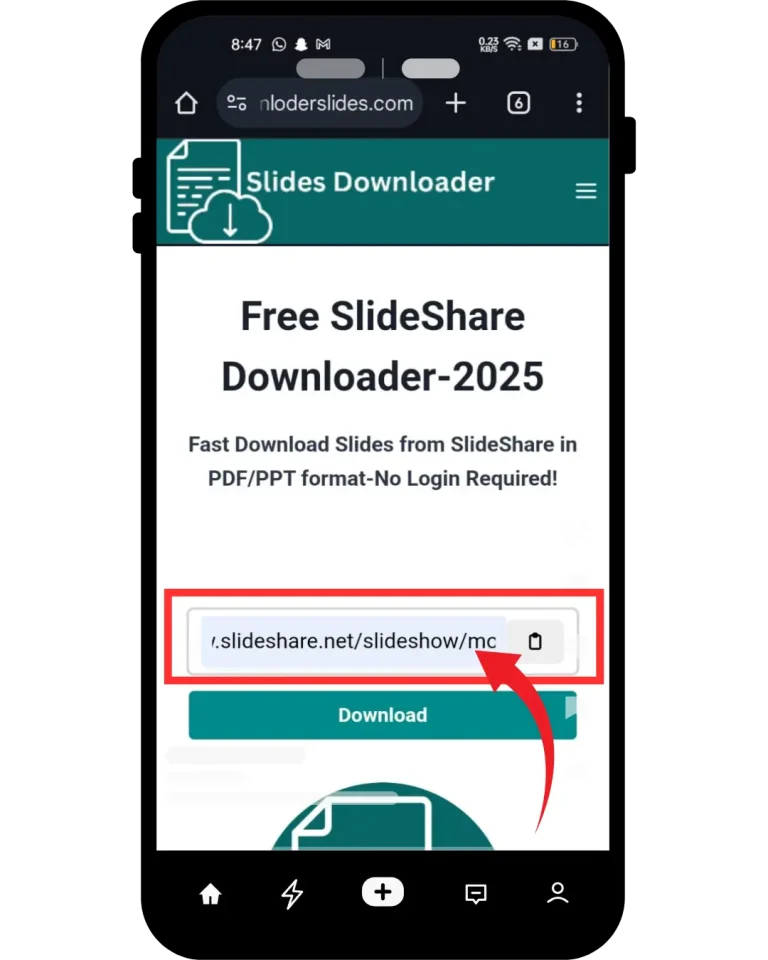
You are on a mobile device; it doesn’t matter whether you are using an iOS or an Android, because this downloader tool is capable for both devices. To download slides on a Smartphone, follow the simple steps provided below. If you still don’t understand, follow the screenshots step by step.
Copy the Slide URL
Go to the Slideshare website, and copy the URL of the slide or presentation that you want to download.

Paste Slideshare URL
Go to the Slideshare website, and copy the URL of the slide or presentation that you want to download.
Download Now
Go to the Slideshare website, and copy the URL of the slide or presentation that you want to download.
How to use SlideShare downloader for Windows?
Ever wondered how to download and save multiple Slideshare presentations and documents for free? This Downloader is the perfect solution! It’s free, easy to use, and lets you download your desired Slideshare presentations in just 3 simple steps, as explained below.
Pro Tip: This is a web-based tool, not an app, so no login is required!
Select Slides from Slideshare
Enjoy your presentation or slides offline and save them anywhere you like!
Powerful Features of Slideshare Downloader
Our SlideShare downloader is designed to make downloading presentations fast, simple, and hassle-free. Here are the key features that make this tool reliable and easy to use.
Instant & Unlimited Downloads
Download as many SlideShare presentations as you want without any limits or restrictions. No waiting, no daily caps — just fast access anytime.
Instant & Unlimited Downloads
Download as many SlideShare presentations as you want without any limits or restrictions. No waiting, no daily caps — just fast access anytime.
Instant & Unlimited Downloads
Download as many SlideShare presentations as you want without any limits or restrictions. No waiting, no daily caps — just fast access anytime.
Instant & Unlimited Downloads
Download as many SlideShare presentations as you want without any limits or restrictions. No waiting, no daily caps — just fast access anytime.
Instant & Unlimited Downloads
Download as many SlideShare presentations as you want without any limits or restrictions. No waiting, no daily caps — just fast access anytime.
Instant & Unlimited Downloads
Download as many SlideShare presentations as you want without any limits or restrictions. No waiting, no daily caps — just fast access anytime.
Instant & Unlimited Downloads
Download as many SlideShare presentations as you want without any limits or restrictions. No waiting, no daily caps — just fast access anytime.
Instant & Unlimited Downloads
Download as many SlideShare presentations as you want without any limits or restrictions. No waiting, no daily caps — just fast access anytime.
Instant & Unlimited Downloads
Download as many SlideShare presentations as you want without any limits or restrictions. No waiting, no daily caps — just fast access anytime.
What is Slideshare?
It,s no secret social media is a vast discipline. There are plenty of websites running under the umbrella of social media. Unfortunately, maintaining presence on all sites is a time taking activity. Moreover, making a decision is hard enough that which site is worth that time and effort. Well, no worries we got to cover you.
In actuality, from all social media sites Slideshare is one of the more overlooked social media platforms which used to post content in the form of PPT slides, PDFs, infographics, and videos.
The best quality of this platform has the potential to invest your time and efforts. Nowadays its use is on the rise for various tasks whether it may be related to education or business. Let,s dig deep to explore the features, pros and cons of slideshare.
Content available on SlideShare
SlideShare is a popular platform where users can explore and share a wide range of professional and educational content. It hosts millions of presentations and documents across different industries, making it a valuable resource for learning and research.
Here are the main types of content available on SlideShare:
📊 PowerPoint presentations on business, marketing, education, and more
📄 Documents and reports for professional and academic use
🎨 Infographics for visual learning
🎥 Videos and recorded webinars
🖼️ Images and visual content
All content on SlideShare is organized into categories, making it easy to discover topics of interest. Users can also save, share, and access presentations anytime from any device.
How to use a slideshare APP?
It is an American hosting service and is not highly technical, so users don’t need skills to understand it, making it easy for everyone to use. Slideshare is simple to grasp, so you don’t need to panic about how to use it. Go to the Slideshare website and sign up using your email or Facebook. Design your slide in PowerPoint software and upload it to Slideshare.
Remember, don’t overlook using a color scheme, fonts, title, and description before uploading your slides. At the end of the day, optimizing your content according to SEO can help it rank at Google #2 when searching.
What’s new in SlideShare
After 20 years, SlideShare has seen a major change, which took place on September 24, 2025. In which the current logo was converted to a stylish logo, and along with this, the complete layout of the website has also been changed. The old ones used blue and orange, with blue as the primary color, dating back to the LinkedIn era, while the new logo has orange accents with white and off-black neutrals, giving it a modern feel.
Along with this, AI tools have also been included in SlideShare in the 2025 update. This AI will help to simplify the Slideshare presentation, rephrase the difficult words, and adapt according to the different users, like students or professionals. This is also in early development, but will gradually become available to all users.
How to Download and Save Slideshare Files?
Using Slideshare is easy, just like any other social platform. While its mobile app is no longer available, you can still access it through any browser on your mobile, PC, or desktop.
Pros and Cons of SlideSharedeshare Files?
Pros
Cons
Personal Review
After testing this SlideShare downloader, the overall experience is fast, simple, and reliable. The tool works smoothly without requiring any login or signup, which makes the process quick and hassle-free.
One of the most useful aspects is how easily you can download presentations in different formats like PPT and PDF. The speed is consistent, and there are no unnecessary steps like CAPTCHA or redirects, which often slow down other tools.
This makes it especially helpful for students, professionals, and researchers who need quick access to SlideShare content for study or work purposes.
Final Take
This SlideShare downloader provides a fast and efficient way to download presentations in PPT and PDF format without any restrictions. With no login required and quick processing, it helps users save time and access content easily.
Whether you’re downloading slides for study, research, or professional use, the tool is designed to make the process smooth and hassle-free.
If you face any issues or have questions, feel free to reach out. Your feedback helps improve the experience for everyone.